COP2220C | Structures, Memory, and IO
Typedef uses#
- It is a simple substitution of an existing data type for a new one
- Effectively it is a new name for the same data
- One common use is creating data types that are more descriptive:
- typedef unsigned char uint8;
- typedef unsigned int uint32;
- Now variable bit sizes are easily seen
- Also has uses when writing code that may run on different processors and platforms.
- What if we wanted to create a more advanced data type?
- Something that could organize several bytes into something new.
- Something more than a simple substitution….
Structs#
- Structs are used primarily for organization of data types.
- Say we are tracking someone’s birthday.
- int year, month, day;
- However those three variables can be considered as one, a date.
- We can create a new data type to hold all of this data and keep it organized.
- Should be created in a logical manner, the variables within the new data type are a piece of it.
- What may be the components to a data type BankCustomer?
- Name
- Account Number
- Balance
Creating Structs Part 1#
First method:
struct {
  int day;
  int month;
  int year;
}  myBirthday;
Not very effective though. This creates a variable named myBirthday which has a data type of the struct defined. What if we wanted to re-use this struct?
Creating Struct Part 2#
Another method:
// define a new data type
struct Date {
  int month;
  int day;
  int year;
};

// declare variables of this type. Name of new type is "struct Date"
struct Date birthday, anniversary, newYearsDay;
This is a little better, we now have a new data type called struct Date that can be used over and over again.
Creating struct with typedef#
By using the keyword typedef we can create this data type as a definition like int, double, short, char…
// define a new data type with a typedef
typedef struct {
  int month;
  int day;
  int year;
} Date;

// declare variables of this type. Name of new type is "Date"
Date birthday, anniversary, newYearsDay;
Much easier to use.
When to declare struct#
It is best to declare structs at the top of your code. Below the #include and #defines. This allows the struct data types to be available throughout your code. Once you have defined it, the compiler now knows about the new data type.
Struct in memory#
In memory structs have their data aligned in memory. Data alignment allows the CPU to access data in the struct efficently because not all variable types take up the same amount of space in memory. Its
- Variables within the struct can be accessed with the . Operator.
- Access via the same name declared in the struct.
- Consider it this way, each variable declared with the struct data type, have their own copy of the variables within.
- Instances of the variable.
Date birthday, newYear;

birthday.month = 11;
birthday.day = 16;
birthday.year = 1980;
newYear.month = 1;
newYear.day = 1;
newYear.year = 2016;
- Variables within the struct can be accessed just like normal variables.
- You cannot just print a struct, you have to access each variable and print it.
printf("%02i/%02i/%i\n", birthday.day, birthday.month, birthday.year);
- You can create your own special print function and other functions to work on your struct.
#include <stdio.h>
typedef struct {
  int month;
  int day;
  int year;
} Date;

// Output the DATE in USA style – pass by value.
void printADate(Date myDate)
{
  printf("%i/%i/%i\n", myDate.month, myDate.day, myDate.year);
}

void main()
{
  Date birthday;
  birthday.month = 11;
  birthday.day = 16;
  birthday.year = 1980;

  printADate(birthday);  // this is a pass by value! Cannot change the data
}
Structs and Binary#
- You can create data items in your structs that are specific bits long.
struct flagStruct
{
unsigned int enabled : 1; //1 bit data item
unsigned int info : 3; //3 bit data item
unsigned int padding : 4; //4 bit padding
};
- This automatically handles a lot of the binary for you.
- It is good practice to make sure you pad the bits explicitly to the nearest byte.
- Otherwise the compiler may do this implicitly for you.
Structs and Object Orientated Programming#
- Structs are the first step in the concept called Object Oriented (OO) programming.
- Other languages such as C++ and Java capture OO programming better.
- However this is a good introduction to the concept.
- You are grouping together data into “objects” that you have instances of.
- Consider making functions that work on the objects rather than long lists of parameters.
Structs Summary#
- User Defined Types (UDT) in C are created with the keyword ‘struct’
- There are different ways to create a struct, and it’s easy to confuse them.
- Create new types so that the code can express the solution to the problem in the same terms the problem is described.
- Adopt a convention for capitalization
- This is the basis for object-oriented programming, but it is not considered object oriented.
- The “things” that are created, are sometimes called “objects,” but OO languages have the capability to add executable code to the data types.
-> operator#
- When accessing a pointer to a struct you cannot use the . Operator.
- Instead a -> operator is used.
- Typically the compiler can catch if you used one rather than the other and notify you.
- This prevent you from having to the use the * with a struct pointer.
- (*pMyDate).day would be tedious over and over again.
- pMyDate->day makes it simpler.
void printADateByRef(Date *pMyDate)
{
  printf("%02i/%02i/%i\n", pMyDate->day, pMyDate->month, pMyDate->year);
}
Passing structs by reference#
- Often when passing structs to a function you should do so by reference.
- Even if you do not plan to alter the data within the struct.
- Why?
- The struct we have is small, but they can be VERY large.
- Especially when working with database tables.
- Passing by value causes a COPY to be generated.
- This can eat away at memory even in a modern computer.
- When passing by reference only the address is copied (4 to 8 bytes).
Advanced Issues with structs#
- What is the size of the struct?
- Can always be determined with the sizeof() function.
- Isn’t the size just all of the variables within the struct added?
- Not necessarily.
- For efficiency, many systems operate on a set amount of bytes at a time.
- In normal standards it is 4 bytes.
- If variables within the struct fall outside the 4 byte boundary, the struct may be “padded” to become compliant.
- This will increase the size of your struct unexpectedly.
- This is a complicated and unintuitive issue.
typedef struct
{
  char oneByte;
  float fourBytes;
} myStruct;

int x = sizeof(myStruct);
printf("%d\n", x); //Outputs 8
system("pause");
- Structs can be inside of each other when it makes sense.
- Just make sure the order of definitions are correct.
typedef struct {
  char addressLine1[30];
  char addressLIne2[30];
  char zip[10];
} Address;

typedef struct {
  char name[30];
  unsigned long account;
  Address address;  // The Address type must be defined
} Customer;
Const keyword#
// You can place the const keyword in front of a variable to prevent it from being changed.
const double taxRate = 0.07;
const int data[] = { 10, 20, 30 };  // elements of array cannot be changed.
Can also be used to protect values being passed by reference into a function.
Such as a struct we are passing by reference by efficiency, not so it can be altered.
void printADateByRef(const Date *pMyDate)
{
  printf("%02i/%02i/%i\n", pMyDate->day, pMyDate->month, pMyDate->year);

  pMyDate->day = 158;  // will not compile
}
Summary#
- Structs are passed by value unless a pointer is used to pass them by ref
- Anything passed by value – there is a copy of the data used by the function
- It is often better to pass structs by ref even if the data is not going to be changed – the size of the pointer is 4 bytes, the data can be quite large
- Use the keyword const to prevent programmers from changing the data in a struct inappropriately.
- A pointer to a struct can use the -> operator to access the component parts of the struct. The -> operator is a shortcut for the more awkward (*p).part syntax
- Structs can be composed of other structs to make more interesting data structures
- sizeof can be used to count the number of bytes in a struct.
Furthermore you can verify that:
- data == &data[0]
- *data == data[0]
The [ ] followed by an index is actually adjusting the memory location that is being accessed. Arrays are always sequential in a block of memory.
- For example: if an array of integers begins at 0x1000, the next element is at 0x1004, and the next at 0x1008.
- This is 4 bytes because it is integers.
- data[index] = base + sizeof(DataType) * index.
- data[1] = 0x1000 + sizeof(int) * 1 = 0x1004.
- data[2] = 0x1000 + sizeof(int) * 2= 0x1008.
// Previously used option – subscript syntax
void passAnArray(double array[], int size);

// New option using pointer – offset syntax
void passAnArray(double *array, int size);

void main()
{
  double data[5] = { 1.5, 2.6, 7.9, 23.9, 9.1 };
  passAnArray(data, 5);   // pass an array to a function
}
- These two options are pretty equivalent.
- Some prefer the pointer method so it serves as a reminder that arrays are pointers.
- Some prefer passing an array as &data[0] rather than just data so that it stands out as an array.
Arrays of characters – strings#
- We covered this before, but are revisiting and expanding on the idea.
- Arrays of characters are called strings.
- Have their own special functions not available to other arrays.
- To be a string, the array must end with the null character ‘\0’
- This signifies to the special functions when the string has ended.
char name[5] = { 'C', 'o', 'l', 'i', 'n' }; //Not a string

char name2[6] = { 'C', 'o', 'l', 'i', 'n', '\0' }; //Is a string
Passing Strings to functions#
- When passing a string to a function the length is not necessarily needed.
- The ‘\0’ character can be checked instead.
- Modern functions often request a max length just to be safe, but still operate up until the ‘\0’ is seen.
int length(char* str)
{
  int result = 0;
  int i = 0;
  while (str[i] != '\0')
  {
    result++;
    i++;
  }
  return result;
}
Strings cont#
- Other ways to initialize a string.
- Anything inside of "" is a string with a data type char*
char name[6] = "Colin";  // a \0 is automatically added when using the ""

char *name = "Colin";  // an array of 6 chars, including the null character
String.h#
- There are many functions available to work with strings.
- Within a library called string.h
- #include <string.h>
- int strlen (char*);
- returns the length of the string, not counting the null character
- int strcmp(char*, char*);
- returns a negative, zero, or a positive number depending on which string comes first alphabetically.
- int strstr(char , char);
- Checks if the first string contains the second string.
- Returns a pointer to where the second string occurs or a 0 if the second string is not a part of the first.
- Good for searching a long string.
Array of strings#
- A string is an array of characters.
- An array of strings might be thought of as a 2-D array of characters, or as a 1-D array of strings.
- Recall the declaration for a string.
- char *name = “Colin”;
- An array of Strings can be declared like this (if you have the strings to use as initializers):
- char *names[] = { “Bob”, “Susan”, “Maria”, “Jody” };
Pointer Arithmetic – What not to do#
Something exists called pointer arithmetic.
- It is accessing the next block of memory on your own.
- It is considered VERY bad programming, though a lot of people find it as a clever way to do things.
- A lot of older code may do this, so you should be aware.
void passAnArray(double *array, int size)
{
  int i;

  for (i = 0; i < size; i++)
  {
    printf("%lf  ", *array);
    array++; //Don't do this
  }
}
Pitfall#
- *pA++;
- May intend to increment the variable pA is pointing to.
- However the pointer itself is being incremented to the next memory location.
- (*pA)++;
- Increments the variable pA is pointing to.
Summary#
- The name of an array is actually pointing to the first memory location in a block of memory.
- The [] are calculating out the next memory location to access.
- You can use arithmetic to change a pointer and access different portions of memory.
- This is not advised.
- *pA++ increments the memory address.
- (*pA)++ increments the data within the memory.
Effective size of an array#
- The capacity of an array may not be the same as the amount of data that is currently being stored.
- If you don’t know how much space will be needed, we will declare a big array, and then use some part of it.
- The amount of data being stored in the array can be called the “effective” size of the array.
- Write a function that will add one more value to an array of doubles. Ask the user to enter that value. Increase the effective size of the array. Return the value that was entered, and put into the array
- Write another function that will print out the data currently in the array
- Demonstrate that the functions are working
double big[100];
int effectiveSize = 0;

getAValue(big, &effectiveSize);
printArray(big,effectiveSize);
Parallel Arrays#
- Array elements are all the same data type.
- Sometimes we need to create multiple arrays of different types to represent the data
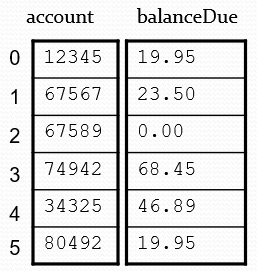
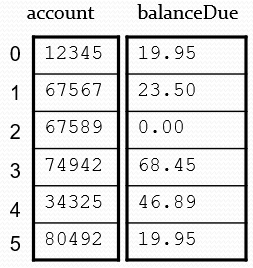
- In this following problems there are 2 arrays, one represents the account numbers, and the other represents the amount due for that account. Since account is an int, and balanceDue is double, we cannot use a two-dimensional array.
- The arrays are related by the indexes, i.e., account# 34325 has a balance of 46.89, they are both at index 4 in the array.
Find Large Accounts#
- Write a function that takes the 2 arrays, the size of the arrays, and an amount. Print out the account that owes more than the amount passed in, and return the number of accounts that have a balance of more than the amount passed in.
Stack – Memory used for program operations. Heap – Memory used for dynamic memory allocation. malloc – A function commonly used for dynamic memory allocation in C. free – A functional commonly used for freeing dynamic memory back to the heap in C.
Stack and Heap#
- There are two areas of RAM in which your program may use.
- Stack and heap.
- The compiler can adjust how much memory it allocates for its stack and heap areas.
- Every variable you declare inside of a function (including the main function) is part of the stack.
- Every function is called has its own copy of information maintained in the call stack.
The Heap#
Memory is made available to the program for dynamic allocation.
This is memory that you, the programmer, manage.
The memory is allocated while the program is running.
Memory given from the heap is accessed with pointers.
Why use the heap?
Amount of memory needed can change each time the program runs.
Static memory (on the stack) has to be a fixed size.
Heap memory can respond to what the user of your software is doing.
Some systems do not perform well with dynamic allocation.
It is not advised for creating mobile applications.
In these scenarios you allocate everything at startup that you may need and make use of while the program is running.
4 functions within the stdlib.h handle heap allocation.
malloc(), calloc(), realloc(), free()
Void Pointers#
- Before we starts, let’s take a slight tangent….
- In C there exists a void pointer data type
- void *
- As opposed to, say, an int pointer (int *) or a double pointer (double *)
- This represents “raw” memory that doesn’t have a data type
- Functions may return a void pointer
- Programmers calling the function need to type cast it to the data type they want.
- Functions may accept a void pointer as a parameter
- Nothing special to do here
- Means you can pass any pointer to them
- Functions may return a void pointer
Heap Allocation Functions#
- void *malloc(int numberOfBytes)
- Takes in the number of bytes to allocate from the heap.
- Returns a void pointer that has to be type cast into the data type you are using to point to it.
- Returns 0 if no memory block of the size requested was available.
- int *pA = (int *) malloc(4);
- void *calloc(int num, int size)
- Same as malloc but allocates num elements of size.
- malloc does this, you just have to do num * size.
- calloc(5,4) = malloc(20)
- Same as malloc but allocates num elements of size.
Good Practices with Dynamic Memory#
calloc and malloc may return NULL (0) if there was no available memory in the heap.
Check for NULL before you start using the memory!
if (myArray == NULL)
{
  printf("Failed to allocate memory! Exiting the program.\n");
  exit(-1);  // stop the program.
}
When you are done using the dynamically allocated memory, make it available for re-use by calling free. Failure to do so creates a memory leak. free(myDynamicArray); // There are pitfalls here.
More useful memory functions#
- memcpy(void *destination, void *source, int n)
- Copies n bytes of memory from the source to a destination.
- memset(void *ptr, int value, int n)
- Sets n bytes of memory being pointed to by ptr to the value specified.
- Great for clearing out memory to 0 or setting a large struct to 0.
- These functions are not necessarily related to dynamic memory.
Memory Summary#
- Memory for variables is allocated from either the stack or the heap.
- The stack is also called the “call stack” – each function’s local variables are available during the execution of the lines of code in that function.
- Memory for local variables is automatically returned to the free space within the stack when the functions end. “Automatic” variables
- Stack size can be set in the IDE. If it is set too small, the program can end with a “stack overflow” error.
Terms to know#
File – Data stored onto non-volatile memory, such as a hard drive. Buffer – Area of memory used for temporary data storage. Stream – A sequence of objects (such as bytes, characters). Appending – When you begin at the ending of a previous data stream. EOF – The end of file character.
Files and C#
- You know files as data saved on a hard drive.
- For a lot of programs you will want to access the files for reading and/or writing.
- Read in large amounts of data for processing.
- Output calculations into a log file.
- Although on a disk, C treats the file as though it was in memory.
- It is like a large block of data in memory.
- Comes with a pointer to this memory.
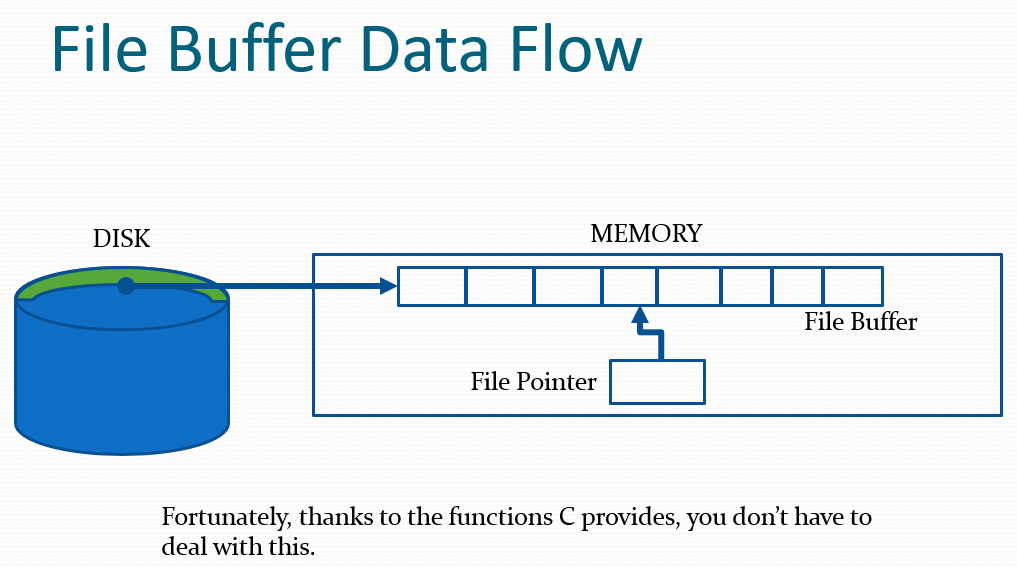
- In reality it swaps data in and out of a buffer.
Files and pointers#
- When reading from a file data is read into a buffer in RAM that you have a pointer to.
- When writing to a file, data is held into the buffer before writing to the hard drive (a slow process).
- The “file position” automatically moves along as you read and write.
- The end of the file is marked by a special character inserted by the O/S – the EOF character

Types of Files#
- Text files are a sequence of bytes on a disk that can be represented as ASCII characters.
- Almost like a very long string.
- May contain escape characters \n \r \t
- May contain an end of file marker (numeric 0x1a)
- Binary files are a sequence of bytes on a disk that represent raw data.
- If you output a double into a file, it will be saved as the 8 bytes that the double contained.
- May be easier to output your data to a binary file as it does not have to be formatted.
stdio.h#
- We have been using stdio.h for printf and scanf.
- Also contain everything needed for file IO.
- FILE * is a new data type.
- Is the pointer to the file’s stream of data.
- FILE * fopen(char *fileName, char *mode)
- Opens the file specified by the string fileName and in the mode specified in the string mode.
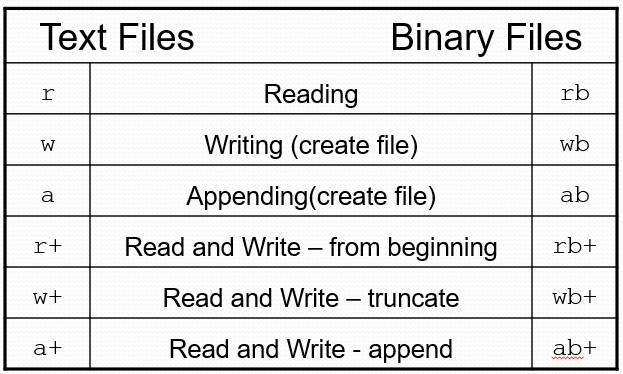
- Mode may be “w” for write, “r” for read, “a” for append.
- Can be combined “rw” for read/write.
- May inclue “b” for binary file.
- fileName can be a location on the disk.
- Returns a pointer to the file that was open.
- Opens the file specified by the string fileName and in the mode specified in the string mode.
- int fclose(FILE *file)
- Closes the file specified in the pointer, returns 0 if successful.
Writing to files#
FILE *inputFile;  // represents a connection to a file

inputFile = fopen("mytextfile.txt", "w");
fclose(inputFile);
- When you read a file “r” it must exist.
- Writing to a file “w” will create the file when it is opened.
fopen modes#
IO for text files#
- fprintf and fscanf
- Work exactly as printf and scanf except…
- You include the file pointer as your first parameter.
- printf(“Hello world!\n”);
- fprintf(myFile, “Hello World!\n”);
- scanf(“%i”,&x);
- fscanf(myFile, “%i”,&x);
- fscanf is pretty terrible for reading from a file if you do not know the exact format.
Better IO for text files#
- int fgetc(FILE *ptr)
- Returns the next character from a file.
- int fputc(int character, FILE *ptr)
- Puts a character to a file. Returns the character written if succesful.
- int fgets(char *str, int num, FILE *ptr)
- Pulls the next line from the file into str and appends a ‘\0’ onto str.
- Reads characters and copies them up until the next ‘\n’ is seen.
- int fputs(const char *str, FILE *ptr)
- Writes the string to a file.
- int feof(FILE *ptr)
- Returns a 0 if not at the end of the file.
- Returns a non-zero value if at the end of the file.
File buffer#
- When you read and write from a file it is stored in a file buffer that the program maintains.
- This is for efficiency as reading/writing to a hard drive is time consuming.
- Data to be read or written is saved in the buffer and sent out in a large block.
- You can control this buffer with the fflush(FILE *) function.
- Flushes whatever is in the buffer so everything is written out to the file and read back in.
- May be useful for debugging
Binary File I/O#
- int fread(void *ptr, int size, int count, FILE *stream)
- Reads in “count” number of elements that are “size” bytes from FILE stream to pointer ptr.
- Returns the number of raw bytes read.
- int fwrite(void *ptr, int size, int count, FILE *stream)
- Write out count number of elements that are “size” bytes from pointer ptr to FILE stream.
- Returns the number of raw bytes written.
- These functions read and write raw data from memory to the file.
Moving File Position#
- When you open a file you read from the beginning to the end.
- It is possible, however, to move the file pointer as needed.
- fseek – move to a specified location, relative to the beginning, end, or current position in the file
- fgetpos – stores the current file position
- fsetpos – returns to a previously stored file position
- ftell – returns the current file position as a long int
- rewind – put the file position at 0 (zero)
Summary#
- Files can be thought of as a sequence of bytes on an external storage medium
- Files can be text or binary
- Reading text files can be complicated. Read the descriptions of the format specifiers carefully. Don’t guess! Incorrect format specifiers will do something, and might appear to work, but the behavior is really indeterminate.
- It is impossible to read a binary file without knowing what the bytes represent – the data types and their locations in the file.
- Binary files can be read and written with large blocks of data or a byte at a time using fread and fwrite.
- You can mix binary and text file access, but it shouldn’t be done. The behavior is indeterminate, and tends to result in guessing what the code will do, and then changing it – over and over.
Reading/Writing Text File#
- Open a file for text writing. Put all of the text in the file that appears on this slide. Close the file.
- Open the file for reading. Read the file one character at a time, counting how many of each vowel occur in the text.
- Close the file, and then open it for reading, this time counting how many words are in the file.
- Output the results.
Reading/Writing a Binary File#
- Open a file for binary writing.
- Generate 1000 random integers between 1 and 100 inclusive, writing them into the file as they are generated.
- Close the file, and then open it for reading.
- Read in all the values, and calculate their sum as they are read. (no arrays needed) Find and output the average of the numbers.
- Repeat the exercise above using an array. Read all the values from the file in one statement.
- Just for fun… If you seed the random number generator with the value 123, use fseek to read the 30th number in the file. What is it?
Summary#
- Don’t mix the use of functions intended for Text and Binary files.
- Keep a reference for the description of the format specifiers handy!
- Close the files as soon as you are done with them.
- Draw pictures of a binary file – use graph paper to help keep track of the bytes.
- Don’t guess! It will take forever to work with files using trial and error, and the result might not be doing exactly what you expect it to be doing.