COP2220C | Algorithms, Pointers, and Scope
Modular Programming#
The problem is broken down into multiple levels and these levels serve to abstract the problem making it simpler.
Top Down Design:
- Starts from the top then you break pieces down.
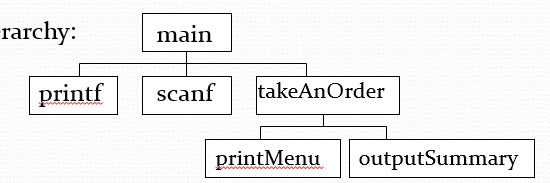
Bottom Up Design:
- Employs is very similar just instead it works with the main level being at the bottom and the broken down pieces being on the top. Basically if you took the image above flipped it 180 deg.
Function declaration#
- Functions have a data type that they return which is regarded as the function output.
- Functions have names which are used to reference them. Like in function calls.
- Functions have parameters which are the inputs for your function. They share the same format with variables
myfunc(var-type name)so likevoid myFunc(int x)is an example.
Declaration vs definition#
- When declaring a function you are specifying the return type, identifier, and parameters without the method body. In other words its just an outline of the function.
- Method declarations are used to tell C that a method exists and the actual method body imported from another c file.
- A definition performs the same steps as a declaration specifying the return type, identifier, and parameters just with the method body as well.
Function parameters#
- Remember that the parameters are local variables because their scope does not exist outside the method itself.
- Remember that parameters are copies of the passed variable. If you want to edit a variable directly a point is required.
Function activity#
- When you call a function it will copy the values of the parameters and then it executes the code in the method body. When all the code has executed the local variables are destroyed (memory release)
Scope#
- When a variable is declared memory is allocated and the memory is associated with the variables name.
- The compiler works with maximum efficiency so any scope that is not used later gets discarded.
- When the variable has been released the compiler will no longer recognize the variable.
- Note: its good practice to keep variables at the lowest scope possible (its released as soon as possible)
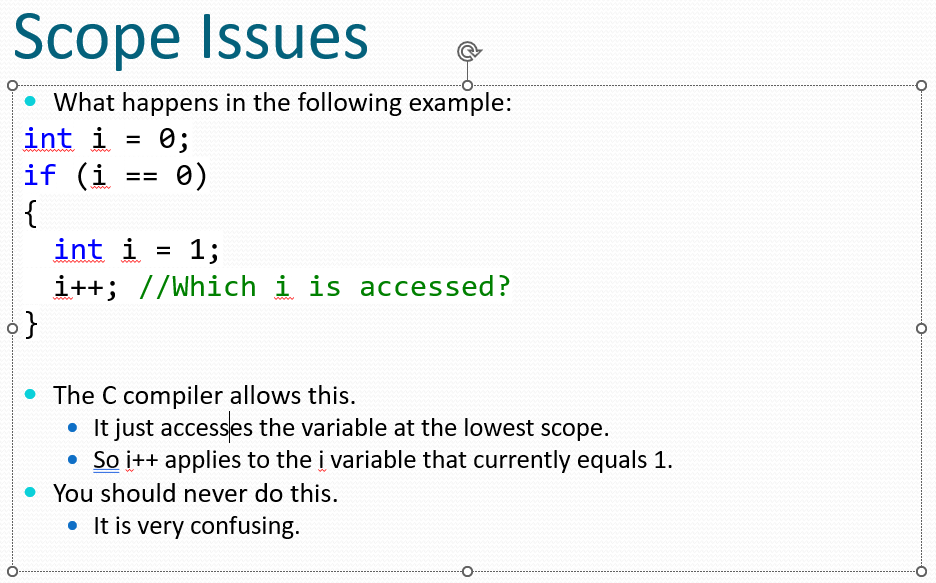
- If scope is ignored its possible that another could be accessed instead of the desired one.
Global Variables#
- It is possible to declare a variable such that it is available throughout your program.
- This allows a variable to carry information throughout your program.
- Global variables should be used as infrequently as possible.
- Too many global variables bogs down what the compiler has to maintain.
- Also makes your code harder to read.
- Still, they have their place and can be powerful to use.
Scope Summary#
- Variable scope decides when a variable is available and when it is lost.
- Good programming declares variables at the lowest (or closest) scope possible.
- Ignoring variable scope may lead to unexpected results or compiler errors.
- Global variables are possible and may be accessed throughout the program.
- You may declare a variable with the same name as another one at a different scope.
- This is considered a very bad thing to do.
Lecture 5#
Terms to Know:
- Algorithm – A step by step procedure that solves a problem or performs a calculation.
- Sorting – Arranging data into a specific manner.
- Bubble Sort – A form of sorting data by bubbling the largest values up.
- Binary Search – A form of searching data that is already sorted.
- Linear Search – A form of searching data from start to finish.
- Big-O Notation – A method to determine the limits of a function.
- Bit – The smallest form of information inside a processor.
- Byte – 8 bits.
Selection Sort#
- Iterate through the list of numbers trying to find the smallest number.
- Once smallest is found swap the number at the current index with the smallest.
- After looping like this throughout the entire list eventually its sorted from least to greatest.
- https://www.youtube.com/watch?v=g-PGLbMth_g
Bubble Sort#
- JUST WATCH A VIDEO ON BUBBLE SORT PLEASE1!!!!!!
Linear Searching#
- A linear search goes through all the elements in a list and compares them until one matches a desired value.
- Works on unsorted and sorted arrays.
- On average the desired element is found after n/2 comparisons.
Binary Search#
- Requires a sorted list from smallest to greatest
- Compares the value its searching for against the middle value and depending on if its greater than or less than determines which side of the list it will search.
- If the value is greater than the middle then search upper section.
- if the value is smaller than the middle then search lower section.
Calculating Middle Number for binary search#
- If the number of elements is odd:
- int middle = smallest + ((biggest – smallest) / 2)
- There are other ways to calculate what the middle index is.
- The calculation you choose will determine what element is in the middle when there are an even number of elements.
- Does it go to 93 or 95? With our formula above:
- 7 + ((12 – 7) / 2) = 9.5 demoted to 9
Summary#
- There are many well known algorithms that solve common problems.
- Nested Loops. Write pseudocode to help with a solid understanding.
- Some programmers use psuedocode as an intermediate step between understanding the problem, and writing the code.
- It takes some practice to get used to nested loops that use arrays.
- Use a picture of the arrays. Walk through code using a pencil.
- Bubble sort is only one algorithm that can be used for sorting. (There are many: selection sort, insertion sort, quick sort, etc.)
- A binary search is much more efficient than a linear search, but the data must be sorted for a binary search to work. There is a relationship between sorting and searching algorithms.
Big O Notation#
- Big O notation will focus on the time complexity of the worst case scenario.
- Constant numbers are not a thing in Big O notation so O(n^2+100) is just O(n^2)
- Another constant rule is O(100) is just like O(1)
- Why does the 100 become 1
- the number is constant and its no dependent on the size of the input
- Constants are discarded because when given huge amounts of data they have little effect on the algorithm.
Analysis of Linear Search#
- Assume we have n elements of data.
- How many comparisons occur before the linear search finds our key?
- Best case, 1 comparison.
- Average case, n/2 comparisons.
- Worse case, n comparisons (the entire array).
- Big O Notation says the linear search takes n comparisons to complete.
- Notation is O(Worse case)
- Linear Search is O(n)
Analysis of Binary Search#
- Assume we have n elements of data.
- How many comparisons occur before the linear search finds our key?
- Best case, 1 comparison.
- Average case, n/2 comparisons.
- Worse case, n comparisons (the entire array).
- Big O Notation says the linear search takes n comparisons to complete.
- Notation is O(Worse case)
- Linear Search is O(n)
Analysis of Bubble Sort#
- Worse case: Array is in descending order.
- 90 88 70 62 55 10.
- Every element needs to be swapped.
- The time spent swapping is constant though.
- It is relatively small given a very very large array.
- We go through the array twice
- Go through bubbling up the largest number – n iterations.
- Repeat n-1 times. The -1 is dropped, equivalent of n iterations.
- O(n * n)
- O(n2)
Analysis of Selection Sort#
- Similar to bubble sort, the array is gone through twice.
- From i=0 to count, then j=i to count.
- Worse case: O(n * n).
- Selection sort is also O(n2) so the algorithm is equivalent to bubble sort.
- There are more efficient forms of sorting. The fastest known sorting method is O(nlog2(n)).
- The fastest known way to search is on a sorted array and is binary search.
What does this mean?#
- For small amounts of data, the efficiency of algorithm rarely matters.
- However, for large amounts or very inefficient algorithms it matters a lot.
- Say a particular calculation takes 1ms and there are 1000 entries.
- O(n) algorithm will take 1000ms or 1 second to complete.
- O(n2) algorithm will take 1000*1000ms or 1000 seconds to complete.
- O(2n) algorithm will take 21000ms or 1.07 * 10^298 seconds or more time than the universe has existed.
Introduction to Binary#
- Computers are electrical machines.
- In the processor, information is represented by presence or absence of electrical signal (very simplified understanding).
- 1 – Signal is present.
- 0 – Signal is absent.
- A “bit” is the smallest piece of information.
- It is either a 1 or 0.
- Most processors take 8 bits at a time.
- This is called a byte.
- Example Byte: 0100 1001
Decimal Representation#
- We use a system called Decimal.
- Have the numbers 0, 1, 2, 3, 4, 5, 6, 7, 8, 9
- Based around the number 10.
- How might the number 327 also be represented?
- 3 * 100 + 2 * 10 + 7 * 1
- This allows us to represent large number with just the 0-9 characters.
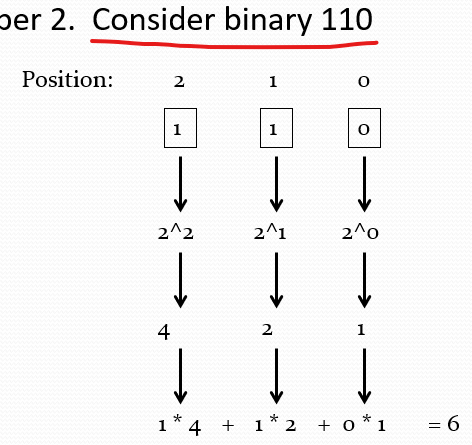
Base Two Rules for binary
| Exponent | Result |
|---|---|
| 2^0 | 1 |
| 2^1 | 2 |
| 2^2 | 4 |
| 2^3 | 8 |
| 2^4 | 16 |
| 2^5 | 32 |
| 2^6 | 64 |
| 2^7 | 128 |
Size of an Integer#
- An int is typically 4 bytes.
- That is 32 bits.
- 1 bit is used for the sign.
- 0 is positive.
- 1 is negative.
- So how much does an int hold?
- 2,147,483,647
Binary Operators#
>>
Shift everything to the right by as many bits specified

<<
Shift everything to the left by as many bits specified

&
Perform a logical AND with the bits of two different numbers.
Both bits have to be 1 to remain 1.  Otherwise the bit is changed to 0.

|
Perform a logical OR with the bits of two different numbers.
If one bit is 1, the resulting calculating is 1.  Otherwise it is 0.

~
Flip all bits from 0 to 1 and 1 to 0.
Binary Operators in C#
int x = 10; //Binary is 1010

int y = 6;  //Binary is 0110

int andExpression;

int orExpression;

int bitShift1, bitShift2;

andExpression = x & y; //1010 & 0110 = 0010 or 2.

orExpression = x | y; //1010 | 0110 = 1110 or 14.

bitShift1 = x >> 2; //1010 >> 2 = 10 or 2.

bitShift2 = x << 2; //1010 << 2 = 101000 or 40.
Hexadecimal#
- We learned about binary numbers
- Two digits, 0 1
- Use base 2
- We also learned about decimal
- Ten digits, 0 1 2 3 4 5 6 7 8 9
- Use base 10
- Now there is Hex
- 16 digits, 0 1 2 3 4 5 6 7 8 9 A B C D E F
- Use base 16
Letters#
- A = 10
- B = 11
- C = 12
- D = 13
- E = 14
- F = 15 NOTE: The prefix 0x is used to indicate hexadecimal
Why is hex so cool!#
- It shortens binary so its more readable for humans. Not to mention it requires less characters.
- It uses base 16 instead of base 2 like binary or base 10 like decimal.
- Because it uses base 16 every 4 bits will represent one hexadecimal unit.
Hexadecimal in C#
- Hex has no special operators like binary does :(
- if you want to print a integer in hex the %x special character in printf can be used.
Storing an address#
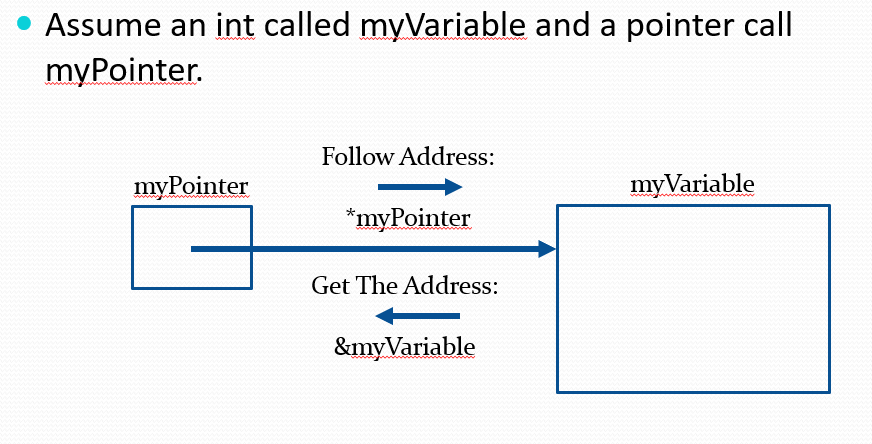
- Memory addresses can be stored in memory we often refer to them as pointers.
- when you want to get the address of memory you use & to do this ex
int *e = &x;.
Operators#
- The star * is often used to state that a variable is a pointer or if you want to dereference a pointer. Dereference:
*pA = 10;sets pA to 10. orint *e;e is a integer pointer.
More Pointers#
- They provide direct access to memory which can be potentially dangerous if you try access memory you do not have permission for.
- When that happens the operating system will shutdown your program often with the error code segmentation fault.
- If the memory is not protected by the operating system you can end up editing memory that belongs to other parts of your program or others causing unpredictable behavior and errors.
- Often times the bugs that involve pointer will have data that changes randomly.
Pointers Summary#
- A pointer is the address of a byte in RAM
- A pointer, address and reference are the same thing
- & is the “address of” operator. Use it to get the address of a variable
- int* is a new data type that can hold the address of an int
- double*, char*, float*, long long* are all data types that can hold addresses
- is the dereference, or indirection, operator.
- The
*operator is not the same as the one in the data type, but they are related because you use the*operator on pointer types. - When you dereference a pointer, you use the piece of memory that is pointed at by that pointer
Pass by reference#
void canChangeMe(int * pParam);  // prototype

void main()
{
  int a = 10;
  canChangeMe(&a);

  printf("a has %i\n", a); // Will print "a has 27"
}

void canChangeMe(int *pParam)
{
  *pParam = 27; // Will change the value outside the function
}
Downsides of pass by reference#
What would happen if we called canChangeMe(X); instead of canChangeMe(&X);?
- Typically the compiler catches this.
- If it did not, then the value held within variable X (10) would be passed as an address.
- The function would then try to access memory location 0xa.
General Rules for pass by reference#
- variables being used for pass by reference should be defined as pointers in the function definition (a
*is used): int myFunction(int passByValue, int *passByReference); - inside the function every use of the variable being used for pass by reference should use the
*operator:passByValue++;(*passByReference)++; - when calling the function use the & operator for the variable being passed by reference:
int x = myFunction(y, &z);
References Summary#
A. Using the return statement is information coming OUT of the function.
B. Pass by value is information going only IN to the function.
C. Pass by reference is information going IN and coming OUT of the function.
Pointers are useful.
scanf("%i", &a);// pass the address of a to scanfA function can pass information back to the caller by using an address
The caller passes the address of a variable to the function
The function uses a pointer data type for the parameter, so that it can receive the address from the caller
A pointer, address and reference are the same thing
When you dereference a pointer, you use the piece of memory that is pointed at by that pointer
the piece of memory that is pointed at by that pointer