COP2220C | Variables, Characters, and Logic
Terms to know:
- Syntax – Rules for writing a program in a particular language.
- Operator – Symbol representing a function that calculates a value.
- Operand – Value to the left or right of an operator.
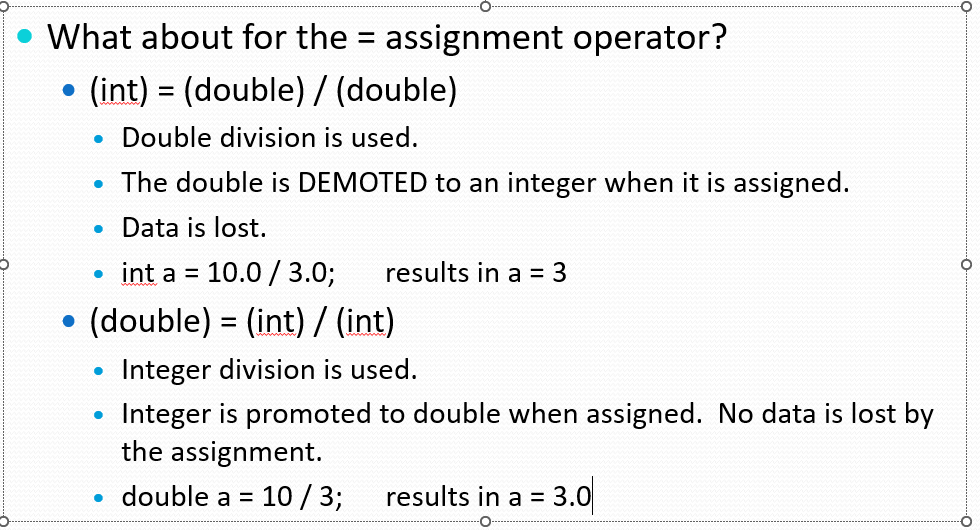
- Promotion – Changing the data type of a variable so that it can hold more information.
- Demotion – Changing the data type of a variable so that it loses information.
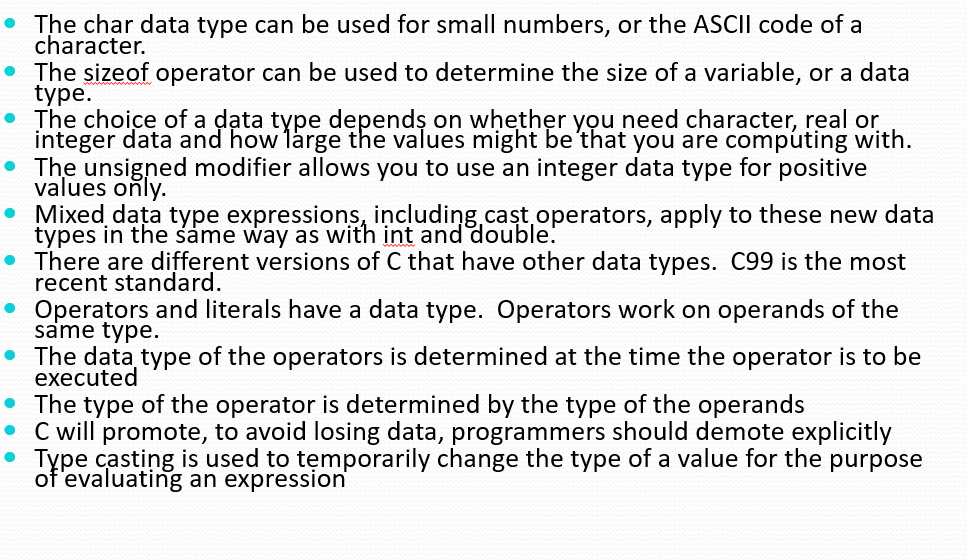
- Type Casting – A way to temporarily and explicitly change the data type of a variable.
How C code compiles:
User written code -> Object file (processor specific) -> Linker Compiles code -> Machine code (executable)
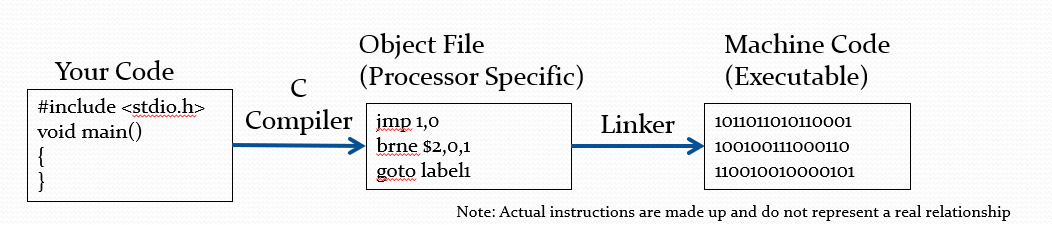
#include <stdio.h>
The code above is a compiler directive telling the compiler to include stdio. Compiler directives start with an # so #define is also a compiler directive.
The #define directive will substitute the assigned value whenever its mentioned. You cannot put a ; at the end of a define
Main Function
- It is required for all C programs in windows. (Maybe compilers allow for other methods but not important for this course.)
- The magical starting point for all of our code.
Language (Vocab) Errors in syntax are called compile time errors because the compiler reports them.
Variable Naming Conventions#
- Variables cannot start with numbers. Ex: 7days.
- They can only contain the characters a-z, A-Z, 0-9.
- Use appropriate naming for the use of the variable.
- Use mixed case for readability.
Random Operator Notes:#
Modulus returns the remainder of division. It’s frequently used to find if a number is even by dividing by two. It’s not limited though.
Variable Reference Table#
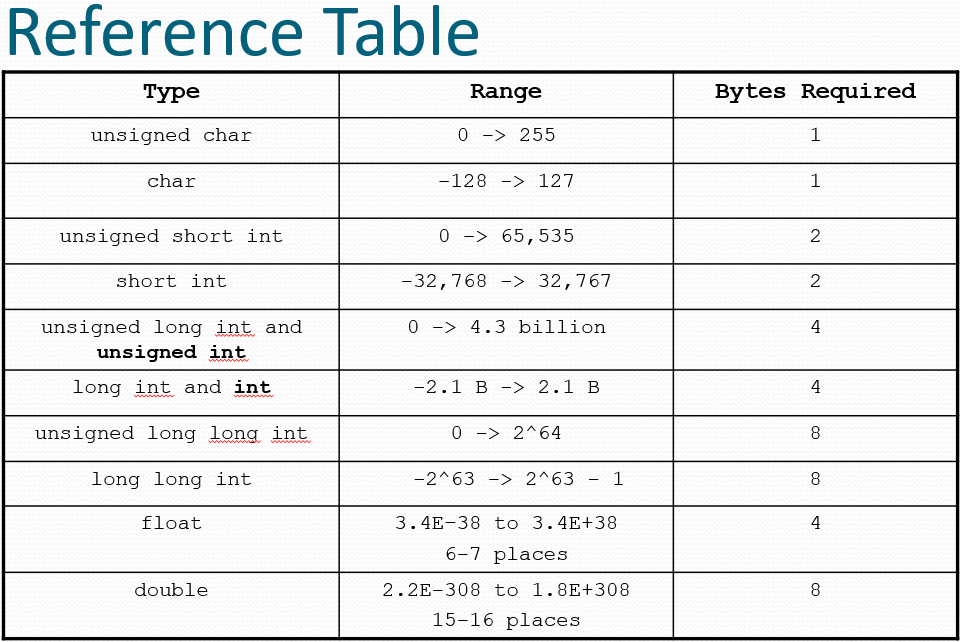
Remember this:
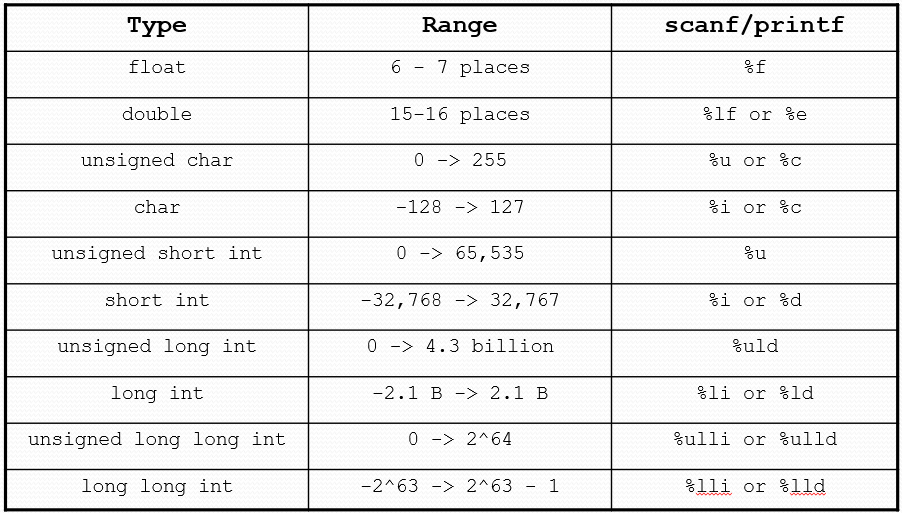
- Smallest whole number – char (1 byte)
- Second smallest whole number – short (2 byte)
- Second largest whole number – int (4 bytes)
- Largest whole number – long long (8 bytes)
- Smallest decimal number – float (4 bytes)
- Largest decimal number – double (8 bytes)
The keyword unsigned can only be used with whole numbers.
- It causes the RANGE of the variable to change.
- Moves from having negative numbers to starting at 0.
The char datatype
- Smallest datatype at 1 byte.
- The single characters in a char are represented with single quotation marks like
'x'but even with a character there is a number in the char variable. - The complier will translate the numbers in a character into text using the built in ascii table.
Operator Data Types:
- Compiler pick the data type of the operator based on the type of operands
- Some examples of data type division:
- (int) / (int) will result in integer division.
- (double) / (double) will result in double division.
- Mixed division:
- (int) / (double) or (double) / (int)?
- The integer will be promoted to double.
- (int) -> (double) / (double)
Lecture 2#
There are lots of options to format output of variable values.
%ifor int values%lffor double values. (This is ell eff)%.2lfspecify the accuracy – places past the decimal.
Instead of output 3.33333333 would output 3.33
scanf syntax:
scanf("Sequence", &variable);
you must specify the sequence of the variable you are inputting data into.
%ifor integers%iffor doubles
Do not use
\nor%.2lfor any special input characters. Why? Thescanfmethod wasn’t designed to handle themscanf pauses the program but will not tell the user the input. (the sequence section )
IO Summary#
- Output information going from the program to the user
- Input information going from the user to the program
- printf and scanf
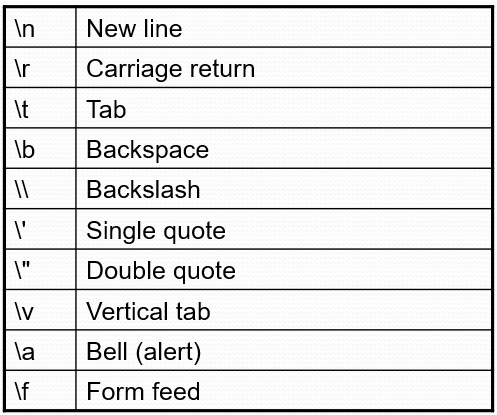
- Escape characters are used to control the position of the output cursor, and to output some special characters
- % sequences, correspond to the variables that are being input or output, and can be modified for formatting the output.
- You can specify the data type of the input, and the type and format of the output.
- Use the documentation for your compiler – search for “Format Specification Fields.”
- Don’t forget the & on the variable name for input!
- A “Prompt” is a message that tells the user what the program is expecting them to enter.
Relational Operators:#
- Relational Operators by themselves aren’t typically used.
- They create a relational expression that can be used with other functions in C, such as the if statement.
- if expression is tied to the code that immediately follows it.
- Decides if the code is executed or not.
- if(TRUE) then the code is executed.
- if(FALSE) then the code is skipped.
Switch Statements: They compare the value of a variable with a bunch of different cases. These cases are called control paths.
Ternary Operator:
Allows for short hand writing of conditional logic. The ternary operator is ? so the lines will look like (x==y) ? run() : stop();
Rules of Precedence:
!has the highest precedence&&when AND and OR occur in the same expression && has a higher precedence.||has the lowest precedence of the operators.- Example:
- a > b || c == d && a < d # do relational first
- TRUE || FALSE && FALSE # next the AND
- TRUE || FALSE # lastly the OR
- TRUE
- Parenthesis can be used to specify the order of precedence
Post and Pre increment:#
You can do:
a++post increment.++apre increment.
What does it matter?
- Determines WHEN the increment or decrement occurs.
- Pre-Increment occurs BEFORE all other calculations.
- Post-Increments occurs AFTER all other calculations.
b = ++a;
- Add one to a then assign to b. b = a + 1
b = a++;
- Assign a to b then add one. b = a Often you do the increments and decrements by themselves.
Summary#
- There are three logical operators:
- And
&&, Or||, Not! - Can be used to express more interesting conditions
- Precedence Not, And, Or
- True and False are numeric in C. Zero is False, Non-zero is True
- New Operator: compound Assignment +=
- a = a + b; a += b; often used for accumulators
- New Operator: increment ++ decrement –
- Pre, and post increment and decrement
- ++ and – break the usual rules of precedence.
Lecture 3#
Building Loops#
int x = 0;
while(x < 10)
      x++;
- Always ask, where does the loop begin?
- What value did the variable start with?
- x starts at 0.
- Where does the loop end?
- What causes the relational expression to go false?
- Once x is greater than or equal to 10.
- How do we get from beginning to end?
- What causes the variable to CHANGE within the loop?
- x++ will increment the variable one at a time.
Counters and Accumulators:
- Counters – Variables used within a loop to count by a set amount.
- Accumulators – Variables within a loop that accumulate data over the loop.
Sentinel and Counter Controlled loops:
- Sentinel controlled loops run until the sentinel is changed to top the loop.
while (count < 10)  // A counter controlled loop

while (testScore != -1)  // A sentinel controlled loop
Do While Loops:
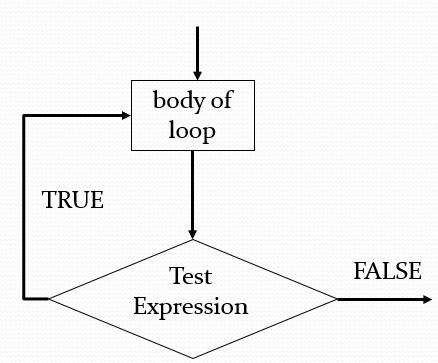
- They are post-test loops that execute code first then check if the need to keep executing after evaluating a condition.
- Which is different then pre test loops which evaluate conditions before executing code.
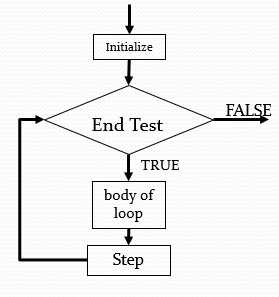
For Loop Execution Chain
Loops Summary:
- Sequence, Selection, Repetition (looping)
- Counter and Sentinel controlled loops
- Start 2. Stop 3. Get there
- Counter variables, Accumulator variables
- Use a test case, and step through the code in the debugger to see its behavior
- while
- Pre-test loop
- Often used for sentinel controlled loops
- do-while
- Post-test loop - generally frowned upon, but may be useful in some circumstances – when you learn the status of the stop condition in the body of the loop.
- Used for counter controlled loops. Very commonly used.
- Use while for sentinel controlled loops.
Random Numbers#
- Brief lesson in generating random numbers.
- C uses an algorithm that takes a starting number and generates a set of random numbers to be called.
- The starting number is called a seed.
- If you give the same starting number, you get the same set of random numbers (pseudo-random).
- Commonly you use the current time as your seed.
- In C time is represented as a single integer.
- This integer is the number of seconds since January 1st, 1970.
- This causes a new set of random numbers every time your program runs.
srand(starting number)– seed functiontime(NULL)returns the current time.- Need to #include <time.h>
rand()– Get the next number in the random set.- returns a number between 0 and 65K.
- Usually you constrain its range with % and addition
- rand() % 6 will result in a random value from 0 to 5.
- rand() % 6 + 1 will result in a random value from 1 to 6.
Generate a random number from 1 to 6 (a dice roll).
- Repeat this 1000 times.
- Count how many times a 1 is seen.
- Output the percentage of times 1 was seen (count / 1000).
- Run the program again 10000 times, 100000 times.
Arrays:
- You cannot change the size of the array after it is declared.
- The size of the array must be a positive integer
- The size of the array must be a constant (not a variable)
- The index for the array must also be a positive integer
- It helps to draw pictures of the array you’re working with
Strings:
- Strings are slightly different than int or double arrays.
- They can be initialized with
“ “ - They need to be the number of possible characters + 1
- A special character
\0is used at the end of every string to signify its end.
- A special character
- Inputting Strings:
- %s is used to print strings.
- scanf is also bad at inputting strings use get instead.